Lee from Point and Stare is incredibly good at his work, and a delight to work with. We tasked Lee with building our custom Jobs Board and Blog on our website. Lee managed to get the sections looking and working the way we wanted, and was very helpful in training us on how to use the system once the work was complete! Thanks Lee!
Blog Archives
BradCamp

Client: BradCamp
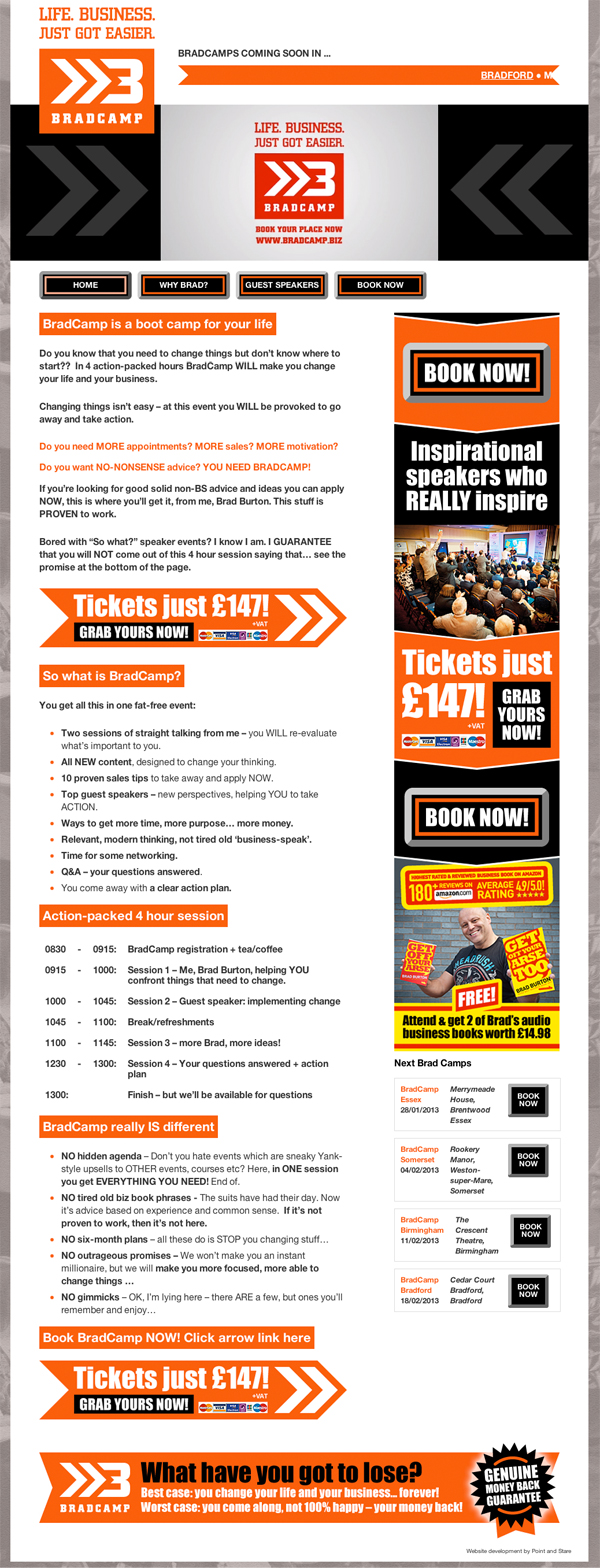
Brief: Develop a website encompassing video/ audio, event management, bookings and payments using WordPress as a CMS.
The celebrated author, speaker and MD of 4Networking Brad Burton asked Point and Stare to work closely with his designer to produce an exciting, dynamic, yet easy to use website containing videos, audio, event management/ booking system that was responsive and worked great across all major devices.
Delighted to take on the challenge the BradCamp website was born in a matter of weeks.
Go check the site out – it could change your business for good!


The a-z of web development

After working in the online industry since 1996 I think I’ve picked up a few things along the way.
If nothing else than to refresh my memory … here is the complete Point and Stare a – z of web development.
This list certainly doesn’t cover every angle but it does give an overview of the world of web development, the techniques we employ and the tools we use.
A – Accessibility
This needs to be built in from the off, giving functionality and benefit to as wide an audience as possible. if your customers can’t access your site on everything from a desktop browser to a tablet or mobile phone, they will go elsewhere. Go mobile or go home.
B – Brand guidelines
Adherence to these promotes good front-end structure and balance throughout.
C – CSS
A Cascading Style Sheet is used to enable the separation of document content from document presentation, including elements such as the layout, colors, and fonts. it also stands for Can’t Stand Scruffiness – keep your code clean people!
D – Doctype
A declaration at the start of an XML document that identifies the root element and DTD of a document. Essentially this tells the browser how to render the page content and has nothing to do with what level NHS treatment you get.
E – Everywhere
Gone are the days of simply making sure your website works in IE6 IE7, IE8, IE9, IE10. Now they need to work across many platforms and devices, from small mobile phones to tablets, laptops and even TV screens.
F – Formats
Ensure all files are produced and named correctly. Best practice is to use all lower case and no spaces giving each file a descriptive name.
G – GIF
Extensively used format best used for displaying images primarily comprised of solid areas of colour.
Animated gifs are making a comeback seem to have taken over the world again – oh lordy!
H – HTML
Hypertext Markup Language (HTML)
is the standard markup language for
documents designed to be displayed
in a web browser.
Clean HTML is produced by
Point and Stare on all projects.
I – Internet Explorer
The browser from Microsoft. Yeah, that one. The one that gives most development companies the shivers. On every project we test across all major browsers, devices and OS where relevant. Thankfully IE is now gone – replaced with the much more developer friendly Microsoft Edge.
J – JavaScript
JavaScript has become one of the
most popular programming
languages on the web and can be
used, as an element of AJAX, for
example, to add motion, dynamics
and depth to a website.
K – Keywords
Keywords are essential within the main content to define the message as well as meta information used by some search engines.
L – Layout
Proportional, liquid, hybrid, responsive – many words to explain the methods and many units of measure exist with the most popular being pixel, em and percentage.
M – Metadata
Metadata is included in the page header allowing for the inclusion of elements such as simple descriptive text, dates or keywords but, please, don’t add a ton of references about Britney, unless, of course, you’re selling Britney stuff.
N – Naming conventions
Name files with relevance and consistency. latest_news_button.gif is more screen reader and SEO friendly than Untitled 24.gif
O – Open source
We strongly believe in both producing, and using, open source code allowing others to share our knowledge and saving clients time and money.
P – Pixels v Points v percentages
A Pixel is a single dot on the computer screen offering significant design control whereas a Point corresponded to a physical size of printed text on paper. Percentages are what we tend to use to create websites as this allows more flexibility across devices.
Q – Query String
A query string is the part of a URL that contains data to be passed to the web applications. Where possible we use URL encoding to turn these strings into English.
R – RSS
An RSS feed can benefit publishers by letting them syndicate content automatically and also benefit readers who want to subscribe to up-to-the-minute information.
S – Socialising
Using social tools like LinkedIn, Facebook, Twitter, Google+ etc are paramount to achieving maximum reach for your information or content.
T – Tips and Tricks
Learning new tips and tricks helps keep our minds active and your projects fresh. Learn something new everyday.
U – Usability
The elegance and clarity with which users interact with a website. For obvious reasons, high on our list of priorities.
V – Validation
All Point and Stare projects go through stringent tests to ensure W3C validation specification compliance where necessary and relevant.
W – WordPress
WordPress is an open source Content Management System that was born around 2003 and for many years has been a major component in the growth of Point and Stare.
X – XHTML
XHTML (Extensible Hypertext Markup Language) is a family of XML markup languages that extend HTML, the language in which web pages are written. The essential difference between XHTML and HTML is that XHTML must be well-formed, while HTML need not be. XHTML also has an X in it, where HTML doesn’t. It’s the little things.
Y – Yahoo! Site Explorer
A service once provided by Yahoo! now merged into Bing Webmaster Tools, now … mehh .. who cares.
Z – z-index
z-index is a CSS property that sets the stack order of specific elements. This allows elements to be overlaid on top of each other giving a faux 3d effect.
Tim Thomas
Client: Tim Thomas
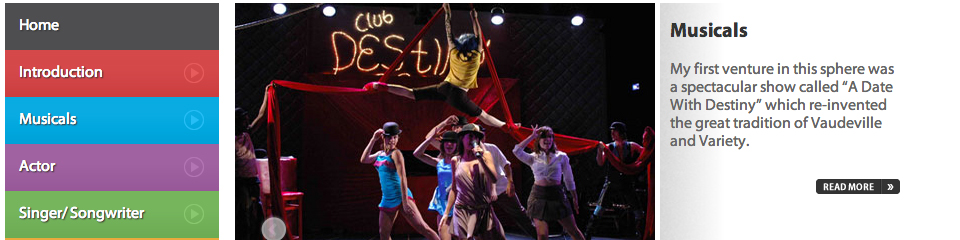
Brief: Design and develop a brand new website promoting Rainbow singer/ songwriter Tim Thomas
The brief was to design and develop a bright, fresh website promoting the amazing talents of Tim Thomas.
Needless to say we had the Rainbow theme tune bouncing around the office for the duration of the project and this was definitely one of those projects where ‘fun’ replaces ‘work’.
Liv Boeree

Client: Liv Boeree
Brief: Work closely with client to create a fresh and funky website promoting champion Poker Player Liv Boeree
The brief was to develop another bespoke WordPress based promotional website for PokerStars. Designed in house and with top quality material, the project flowed smoothly and is very successful.


Please note: This project was completed in 2012 and the website has, of course, moved on from these designs.
Vicki – Clear Creations
Lee from Point and Stare has been incredibly patient and full of advice and tips, even when its not been beneficial to his work load! Things have been explained at each step of the way and Lee has always had the time to respond to queries and ideas.
I am delighted with our new site and it certainly meets the brief of being user friendly and simple for the consumer to buy.
As we build a presence for the site I would not hesitate to use Point and Stare again to build on what we have.
Jonathan Duhamel

Client: Jonathan Duhamel
Brief: Work closely with client to create a multi-language website promoting champion Poker Player Jonathan Duhamel
The brief was to develop a bespoke WordPress based promotional website catering for the English and French speaking fans of champion poker player Jonathan Duhamel. Design was catered for in-house which gave me the time to develop a client happy project.


Clear Creations

Client: Clear Creations
Brief: Develop a fully operational online store selling handmade greetings cards using WordPress as an ecommerce platform.
Clear Creations approached Point and Stare because they were looking to take their online store to the next level.
The brief was to develop an online store that encapsulates the simplicity and elegance of their products with the ability to build an online presence and bespoke WordPress based ecommerce website.
Overall the client was very pleased, which lead to them emailing over a brilliant testimonial.


Create a child page dropdown list – WordPress

Over the years WordPress has developed into a very powerful CMS and there’s some very clever stuff being created by some very clever people.
Meanwhile, back at the ranch … A recent client asked to create a dropdown list of child pages and a short while later we had this solution.
Firstly, What is a Child Page?
From the codex:
“To turn your current Page into a SubPage, or “Child” of the “Parent” Page, select the appropriate Page from the drop-down menu. If you specify a Parent other than “Main Page (no parent)” from the list, the Page you are now editing will be made a Child of that selected Page. When your Pages are listed, the Child Page will be nested under the Parent Page.”
The code below can be used within a WordPress theme page to create a dropdown containing a dynamic list of child pages.
The main element to consider is:
‘post_parent’ => 10 <– This is the ID of the parent page.
You can see this in action on this client site.
<?php $args=array(
‘post_parent’ => 10,
‘post_type’ => ‘page’,
‘orderby’ => ‘menu_order’,
‘order’ => ‘ASC’,
‘post_status’ => ‘publish’,
‘posts_per_page’ => -1,
‘caller_get_posts’=> 1
);
$my_query = null;
$my_query = new WP_Query($args);
if( $my_query->have_posts() ) {?>
<form name=”jump”>
<select onchange=”window.open(this.options[this.selectedIndex].value,’_top’)”>
<option value=”#” selected=”selected”>Please select</option>
<?php while ($my_query->have_posts()) : $my_query->the_post(); ?>
<option value=”<?php the_permalink() ?>”><?php the_title(); ?></option>
<?php endwhile; } ?> </select>
</form>
<?php wp_reset_query(); ?>
If the above has totally confused you, don’t worry, just get in touch and we’ll sort it for you.
Jain Wells

Client: Jain Wells
Brief: Design and develop one page website using WordPress as a CMS.
Jain approached Point and Stare after being recommended by another of our clients.
The brief was to develop an online and offline strategy that included website, MySpace and Twitter presence as well as products like CDs and flyers.
Overall we produced and advised on all aspects from the preferred CMS platform, photography, print stock and branding as well as delivering a dynamic online presence that integrated social media functions and smart phone/ tablet compliance.


