Social Media – Point and Stare

Top 10 social profile locations for businesses

At Point and Stare we have been aware for a long time of the massive impact that modern social media can, and does, have on our everyday lives – even if we never use it.
We have been involved in setting up bespoke Twitter robots, registering clients on over 500 social media networks and even writing A-Z and top 10 lists on the subject.

We have all been using social media since we were around 2 years old – talking – now we all use tools like Twitter, LinkedIn, Facebook and Digg, to name a few, without batting an eyelid.

The tools of social media are growing and changing every minute and to be on top of the game takes discipline and skill.
On each project where Social Media is a requirement, we can bring to the table many qualities such as research, knowledge and trust and are well aware of the need to research, test and test again.

One area of social media that is regularly under-used is monitoring.
You’re putting a fair amount of time, and possibly money, into establishing your social presence but without monitoring it’s pretty much wasted.

Some of the basics that you should be doing:
1, Within your Google account you should see a link to Google Alerts – if you cannot see it simply go to google.com/alerts and run a basic check.
Set up correctly, Google Alerts will send you emails at regular intervals – you can choose either once a week/ day, or ‘as it happens’ – with information about your chosen keywords.

2, Set up company accounts on YouTube and Flickr and add relevant content – product shots or ‘how to’ videos are very welcome.
Also weekly/ monthly brand keyword search will allow you to ‘favourite’ any results that are found.

3, Claim your name on Facebook and Twitter. Sign up on Facebook and Twitter and set-up company profiles. Again using keywords, photos, videos etc to express yourself.
Perform a regular search on https://www.facebook.com/search and https://search.twitter.com for references to your brand/ company.

These are very basic starting points that we use on all client projects so please get in touch to discuss your options in more detail.

10 ancient elements of a website

When I started designing and developing websites in 1996 all we had to do was block out a load of images and text.
Pages were named .HTML, laid out using tables, images had to be as small as possible, (28k modem anyone?) and text was mainly center justified.

Life was easy and the rates for a ‘webmaster’ were good.

And then the massive explosion came and everyone and his uncle started a web company and sites needed to be produced at such an enormous rate that style simply went out the window (frame).

At that time there wasn’t really anywhere to learn the trade, most webmasters learnt on the job, and the simplest way to whack out a website was to take something that you liked, save as, and change a few bits of content which led to a lot of sites simply being duplicated and looking the same.

Thankfully time has passed enough for designers and developers to concentrate on their chosen craft and produce some quality work.
That said, there is still a ton of antiquated sites out there – so, if your site features any of the below you seriously need to talk to your ‘webmaster’.

1, Mission statement – “We promise to do our best …” What is this? The boy scouts? If I pay you a lot of money I naturally expect you to do your best so there is no need to tell me exactly the same as everyone else.

Frames2, Frames – Using frames allowed you to place 2 pages side by side. Nowadays there are much cleaner and SEO friendly ways of achieving the same effect.

3, Blink tags – Distracting, annoying and cheap. A users attention should be grabbed subtly not by ramming the message in their face like a clown’s custard pie.

Dancing baby4, Animated gifs – Usually built in MS Paint with a different background to the rest of the page or in faux 3d. Dancing baby anyone?

5, Tables – Once the best, now the worst way to build a page. Tables are for tabular data not layout.

6, Flash – Again, once was the best now it’s really not needed especially for navigation and especially when you need to accommodate viewing on other platforms and OS’s.

7, Very small Quicktime movies – Used to be the only way to view video online but, due to low modem and compression rates, had to be displayed at a very small size.

8, MIDI music – Ignoring the copyright laws for a second, why do you need to annoy everyone in the office and destroy my ears with your awful choice in music?

9, Hit counters – Congratulations, you’ve had 20 people access your homepage. Errr … rather embarrassing really, don’t you think?

Netscape Now!10, ‘This site is best viewed’ slab – All websites are best viewed on a computer.

If you know of any other ancient online trend, get in touch and we’ll add it to the list.

RAW Productions

Raw Productions

Client: RAW Productions
Brief: Design and develop dynamic online presence integrating social media facilities and smart phone/ tablet compliance. Special consideration had to be made regarding presenting video on non standard browsers.

After working on other projects, RAW Productions commissioned Point and Stare to develop and design an online presence to match the high quality of their own products and services. Because of the target market, the website had to be compatible with a range of smart phones and tablets.
Using WordPress as the back-end CMS we have produced an online presence to be proud of.

Custom development included HTML5/ CSS3 integration, blog feed and bespoke image slider.

Testimonial:
Point and Stare have provided us with a fantastic new website and CMS – every element of the construction was well thought out, with usability, web standards and SEO in mind. From the outset Lee has always been at the end of the phone to help with any issues and gone way beyond the call of duty to ensure client satisfaction. I can’t recommend Point and Stare highly enough … True professionals.

Please note: This project was launched in 2011 and has since been redesigned.

Use Dropbox to customise your WordPress admin

Use Dropbox to customise your WordPress admin

Not only do we produce bespoke designs for the front end of all our WordPress based projects, we also include a redesign of the Dashboard and the admin area.

In case you didn’t know, Dropbox is the easiest way to store, sync, and, share files online and can be used for hosting various elements of a website so in this article I’ll show you how to use Dropbox to include your logo in the WP Admin footer.

BEFORE YOU GO ANY FURTHER MAKE SURE YOU’VE MADE A BACK-UP OF EVERYTHING

Next thing to do is sign up to Dropbox.
Once you’ve done that, upload your logo to your public directory.

In your functions.php, paste this code:

// ADMIN FOOTER STUFF
function modify_footer_admin () {
echo '<a href="http://MY SITE.com"><img src="THIS IS WHERE YOUR PUBLIC LINK WILL GO" alt="MY COMPANY" /></a> MY SITE online presence developed by <a href="http://MY SITE.com">MY SITE</a>.';
}
add_filter('admin_footer_text', 'modify_footer_admin');

Next, go back to your Dropbox account.
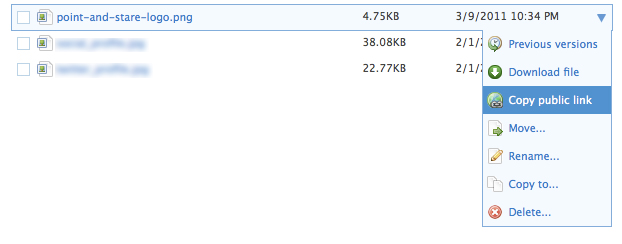
Rollover the relevant file and on the right you’ll see a down arrow, rollover this and select ‘Copy public link’

Using dropbox to customise your WordPress admin

Back to your functions.php and paste the public link into ‘THIS IS WHERE YOUR PUBLIC LINK WILL GO’.

Don’t forget to also change the relevant ‘MY SITE’ details.

Upload the changed functions.php, refresh your dashboard and check everything works in the footer.

Customised WordPress footer using Dropbox

That’s about all you need to do to enable a connection between your client’s sites and you plus, when you change you logo you’ll only have to update the one on Dropbox.

Ryan Wilkins – RAW Productions

Point and Stare have provided us with a fantastic new website and CMS – every element of the construction was well thought out, with usability, web standards and SEO in mind. From the outset Lee has always been at the end of the phone to help with any issues and gone way beyond the call of duty to ensure client satisfaction. I can’t recommend Point and Stare highly enough … True professionals.

Gill Bray – Business Hat

Lee is one of those people whose opinion I will now value regardless of the business subject. There are people one bears in mind when needing to make a good business decision, and Lee is one of them.
He is passionate about what he does, honest, even when honesty is uncomfortable, and fair. Without doubt now a first port of call for web development.

Suraj Sodha – Internet Marketing Highway

I’ve known the Point and Stare guys for about a while now and consider them very good friends.
They are outstanding at what they do in business and provide massive value for their clients through high quality and professional work.
Point and Stare are the guys to go to if you want to improve your online image.