So, You want to get online, huh?

So, You want to get online, huh?

With over 20 years of industry experience I have come across some very nasty cowboys (and cowgirls) that don’t seem to grasp the simple premise of doing business – treat your customer right and they will come back for more.

Even after many ‘discussions’ on the subject it seems there are still plenty of web firms around that seem to want to grasp at every little handcuff they can.
I won’t go into the complex psychological desperation messages this sends out but, instead will offer some nuggets of information that will hopefully stop you getting ripped off, stressed out and ultimately lose everything, when it comes to getting your business set up online.

Sign up or sign out
It is of the utmost importance that everything is registered in your company name.
The reason being, if you fall out with your web guy, if they go bust or there’s an access issue, you will have full control over everything.
Don’t let the web guy register your domain on your behalf – it is very simple to do this yourself – they will register it in their name and you’ll be stuck.
I’ll recommend a few options, below, but of course, if you have your own preferences feel free to go with them, just be careful.

Get your own (domain):
First thing you need to do is register a domain name.
Ideally this would be the same as your company name and a .com – this isn’t always possible but for the sake of this article, let’s presume we have no naming issues.
I recommend using https://www.gandi.net for domains.

Get your own (host):
One element I always recommend is that you should register your domain and get your website hosted with different companies.
My reason for this is that if you have hassle with one, you can still move stuff around.
Recently 123Reg ‘decided’ to delete a load of business websites – domains, files, databases the lot!

I recommend Krystal for hosting.

Get your own (website):
Now you have your domain and hosting set up, you need to get the website built.
You have 2 choices – DIY or pay a professional.

DIY: Within your hosting package control panel you should be able to find either Fantastico or Softaculous – these are free “1 click install” portals allowing you to set a few preferences and install applications like WordPress etc with just a few clicks.
If you go this route, that’s cool but you will get a default install which might not necessarily be up to date. Not really as dramatic as it seems as this would simply be a starting point.

Go Pro: If you’re serious about maximising your online presence I would totally recommend getting a professional outfit to design and build for you BUT do your due diligence.
Get recommendations, check out their own website and ask for at least 3 recent clients that you can contact for a recommendation, check the firm at companies house. If they do not display company information – registered address, business number, VAT number – on their own website, walk away.

Always sign a contract (after your lawyer has read through it) and never pay more than 50% deposit – preferably with a card as you might be able to then dispute it later.
If you do choose this route, ensure everything is covered in a full brief, make sure both parties are 100% clear on what is expected, what’s to be delivered and when and make sure everything is in your name and that you have full access – the admin panel, files, database etc.
Ideally you should have a back-up sent to you each week/ month (if you’re on a maintenance contract) or at least once you’ve paid the remainder.

Like any major business transaction – do your due diligence, get everything in writing, make sure the supplier is as transparent as can be and, if any doubt creeps in, ask for help or advice.

How many ways can you launch yourself online with WordPress?

Multiple WordPress icons

WordPress is an Open Source script for building websites, blogs and online stores.
As it is Open Source, this means there are hundreds of people all over the world contributing to the core files plus it also means you are free to use it to build whatever type of website you choose.

Since its inception in 2003, WordPress has forged ahead to be the power behind around 40% of all websites with more being launched every day.

Themes are the skins, the look and feel – the part you, and your visitors, see when accessing your website via a browser and the amount of free and premium themes is huge.
Plugins are modules that you can install for specific functions, for example SEO, online shopping or social media interaction. Due to its customisable set up, there are over 50,000 plugins in the WordPress repo alone plus many, many more plugins you can purchase.

Me set me up
The easiest way to get yourself online using WordPress is simply to go to wordpress.com, register for free and you’ll be online within minutes.

The drawback to this; this route is less flexible than the WordPress you download and install yourself in regards to themes you can use and the functionality you can build in.
The bonus is that you don’t need to worry about security, updates or any technical stuff as this is handled by the world class technicians at WordPress.

By default your website will live on a sub-domain – mysite.wordpress.com but you can pay a minimal fee and use your own domain – currently from £36 per year.

You set me up
The other option is to run the WordPress script on your own server.

To be able to install WordPress on your own server, you’ll need a server (well, duh!) and the easiest way to do this is to open a hosting account for your domain.
Once you have set up the account you have 2 options for installing WordPress onto your new account.

The easiest, non technical, way to do this is to look around your hosting account control panel for something called ‘Fantastico’ or ‘Softaculous’ – these are 1 click installers for various scripts, including WordPress – if you cannot find it, speak with your host.

Using Softaculous to install WordPress

Once you find it, click, fill in some details and within a few minutes you will have yourself a new website.
The drawback to going this route is that sometimes, the scripts installed are not up to date or can contain web host specific settings, like injecting the hosts name/ URL into posts or comments or within the theme itself.

The other, more technical way, is to install the WordPress script yourself, manually.
To do this you need to look at things like setting up a MySQL database, FTP and, if you want, version control.

In either of these 2 set-ups there are a few things you need to be aware of like making sure everything is secure, regularly updated and backed-up but, of course, there are many plugins to help you with that!

Can I have more, please?
As a new business, I often advise going these routes just to get yourself set-up rather than spending £thousands but once you’re established and have the marketing budget and/or the requirements to develop your online presence, again, there are many options you can take.
As an example, if you’re just looking to have a front end that looks more original or on-brand or require custom functionality, you can get a company, like Point and Stare, to design and build a bespoke theme or, you might need specific back-end functions, again, speak to Point and Stare and we’ll be more than happy to help.

So, if you’re looking to get yourself set-up online with WordPress, and we strongly advise that you do, I hope the above has helped and, of course, feel free to get in touch with any questions you may have.

What makes a great business consultant?

What makes a great business consultant?

When your business is your baby, giving an outside expert the insider’s nod can be just as exciting as it is terrifying. In the fast-paced, cut-throat and competitive 21st century playing field, the ability to pre-empt problems and have solutions at the ready is more important than ever. Here, we outline some top qualities of a great business consultant, so you know exactly what to look out for when tackling the all-important task of finding the right consultant for your team and getting ahead of the game.

The critical eye
A good consultant is a rare species, in that they need the unique ability to be able to pinpoint an issue before it escalates into a problem. With confidence to voice their concerns, they will have hawk-like attention to detail, good judgement and CEO-worthy business acumen.

The interest
Your consultant will not just need to take the time to get to know you and your product, but also your precious clientele. They will be enthusiastic, emanating a drive and motivation that reminds you of why you started your business in the first place. Look for candidates that ask a lot of questions to get to know the business, and be wary of the sales snakes that slither straight into offering solutions without knowing anything about your business.

The activity
A great consultant is a popcorn machine of new ideas and solutions. They will be actively striving to communicate their ideas and offer an outside perspective without necessarily being prompted. Ultimately, you need a consultant that will show you what you don’t know that you don’t know.

The adaptability
The best consultants are flexible, seamlessly slipping into your company and catering for your unique business needs. Furthermore, with their expertise often spanning different industries, it is crucial that they are on top of the latest trends, showing an ability to adapt and respond to the ever-changing global market.

The trust
In the age of digital media, time truly does equal money, so when it comes to hiring a consultant, you need to trust that they will deliver the goods how and when they say they will. In addition, it is likely you will need to expose your consultant to sensitive or confidential information, so keep an eye out for those that shout about past client statistics.

For all of the above, and more, get in touch with Point and Stare today to find out how a consultant could help take your business to the next level.

What does WIIFM mean?

Justified Gig Options - WIIFM

When you first set up in business, you end up taking on any old job just to get the ball rolling and some cash coming through the door.

Hopefully all the work coming in is exactly what you want/ need but reality is not like that and you will find yourself spending way too long working on something you dislike for less than minimum hourly wage – in effect a low rent gig (low rent as in – you’re getting nothing in return, be that cash, enjoyment, time etc).
But, you have to crack on because, after all, it’s better than nothing.

Then, hopefully, as time goes on, if you haven’t folded and gone back to a ‘proper’ job, you start to see some pretty top quality gigs come your way.
Your confidence builds, you attract more quality gigs and then all of a sudden you get the offer of one of those ‘low rent’ gigs (the ones you would previously take on without a thought) but this time, you are more settled in where you are going, you’re more focused and regrettably, but thankfully, you turn the gig down.

If you’re still at that point where you don’t feel comfortable turning down work, my advice is to give yourself a break and look at it as a learning session.
There’s nothing more important than learning how to do your job better, as this is then reflected in your output which can lead to work that’s more aligned with your goals.

When WIIFTC turns in WIIFM
Because of your hard work over XXX amount of time you’ve built up a reputation, you’ve learned well to the point that you’re now able to give yourself justified gig options.
When you start out it’s all ‘what’s in it for the client?’ but now it’s (or at least it should be) ‘what’s in it for me?’.

Noli Esse Dick
Learning when to say no and when to outsource, or pass on, is a major pain point for some but it can be a massive empathy lesson.
It’s okay to say no when you feel the gig would be against your principles, the budget doesn’t match your price point etc but always be prepared to recommend someone else.

If it’s not for you, fine, but it might be the exact break that a connection is looking for.

If you’re at that point where you have enough work coming in then give someone else a break.
Don’t simply turn down work because you think the job is below you, but, think how important that work might be to someone else.
And, you never know, that potential client you just turned away with a bad taste in their mouth might turn into a global corporation with a massive budget to work on a project which you would kill for.

No matter what crap comes your way in business, always have a shovel handy to clear up the mess.

How to exert your business’ authority

How to exert your business’ authority

Gone are the days of traditional advertising, meaning that a catchy slogan and ear-burning jingle no longer cut the mustard. Instead, businesses must forge a relationship with consumers, earning their trust subtly and slowly for the most effective, long-lasting results.

‘By golly’ and ‘How do I do that?’ We hear you cry.

All hail content marketing. In other words, showing – not telling – your audience what your business is all about. With people swarmed with information on the Internet, your job is to create a social media soup of fresh, relevant and useful content that demonstrates an understanding for their needs and values.

Here, we share 5 tips from to get you started.

1. Solve a problem
The key is to craft content of genuine use to your target market. While this may feel a little like giving away your precious knowledge for free, it asserts both confidence and expertise, meaning customers will look to you as the top dog when it comes to their all-important purchasing decision. (A how-to video is a brilliant example of this.)

2. People first, search engines second
Yes, SEO is the bee’s knees – it catapults you to the top of the search results, (according to the constant stream of emails I get from so-called gooroos!), and you get to use fancy, in-the-know phrases like ‘long-tail keywords’. However, be aware that writing solely to impress Google will only alienate your readers, ultimately stinging your ranking as search engines get better and better at deciphering between content of use, and keyword-stuffed jargon.

3. Keep it consistent
Up-to-date posts and a clear tone of voice is a sure-fire way to gain loyal followers. By allowing your audience to know who you are and when to look out for you, you begin to establish a two-way relationship, meaning customers are more likely to trust you with their hard earned cash in the long run.

4. Don’t be afraid to share others’ content
Content marketing has turned traditional advertising on its head. Now, in order to assert authority in your field, you need to show that you’re not threatened by the competition – the big boys, if you will. The psychology of sharing your competitors’ posts not only makes you one of them, but also grounds you as the funnel of interesting, useful content.

5. Engage and respond
Don’t ignore the ‘social’ part of social media. Make yourself ever-present and encourage conversation among your readers, injecting personality and keeping in mind that the best, (and most shareable), posts are often those that provoke discussion. Lastly, take note of your analytics, learning and developing from anything that doesn’t seem to be working.

For help in setting up your content marketing strategy, get in touch with Point and Stare today.

How to : Embed the New Twitter DM button

Twitter DM button

At the end of August 2016 Twitter introduced the facility to add a Direct Message (DM) button to your website.
Although not the most earth shattering function it does allow businesses to utilise Twitter DM functions much easier as a customer support tool.

Point and Stare have been using Twitter as a customer support channel since day 1 but, to enact a DM previously both parties needed to be following each other.

What this new Twitter DM button does is bypass this need allowing your customers to contact you instantly.

Why not Tweet rather than DM?
Sending a tweet allows the content to be available publicly, a DM is more private. Although I strongly recommend never sending personal information over Twitter – credit card numbers for example – they are a more secure way to commence a personal connection.

So, How do I set this up on my website?
Essentially it’s fairly straightforward as long as you read the Twitter instructions.

You will need:
Access to your own Twitter account, including your Twitter ID
Access to your website – if you’re running a flat HTML site you’ll need access to the file you’ll be adding the code to, if you’re running a WordPress website, you’ll simply need access to the page where the button will live.

1, Go to: https://publish.twitter.com
Scroll down until you see the ‘Or browse your options below’ section
Click the ‘Twitter Buttons’ panel and a pop-up will load

Twitter DM button

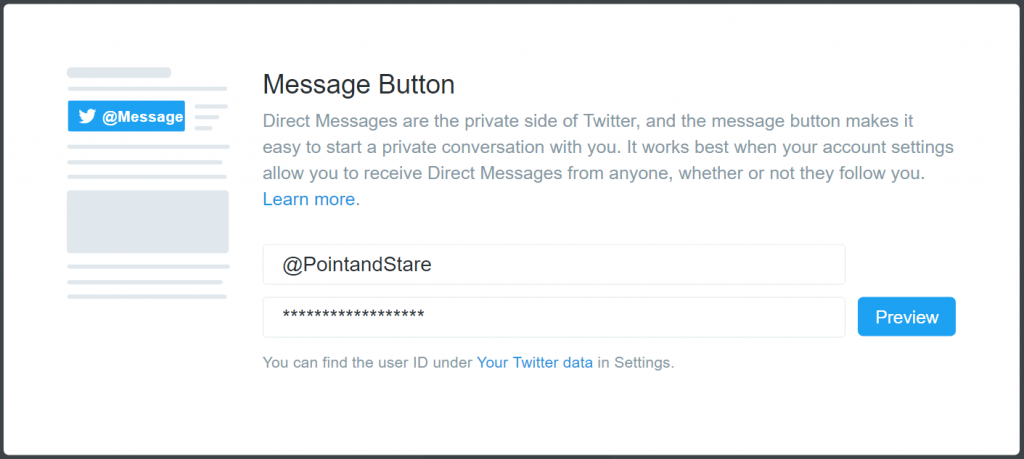
On the right you’ll see the ‘Message button’ image – click it

Twitter DM button

You’ll then need to add your Twitter username and user ID

Twitter DM button

Once set, you’ll be presented with your bespoke embed code.
All you then need to do is copy/ paste that code where required.

You can see the button in action on our contact page – go ahead, test it!

Of course, If you need someone to sort this for you, just get in touch and we will be more than happy to help out.

A Guide To (Legally) Sourcing Images For Your Website

A Guide To (Legally) Sourcing Images For Your Website

According to a study by Microsoft, the average human attention span has fallen to a mere 8 seconds. So what does this mean for your business? It means that a fish has more odds of making it to the end of your blog post than your prospective customer (a goldfish has an attention span of approximately 9 seconds).

While this isn’t bad news for our orange friends, it does mean that marketers now have less time to grab and retain their readers, creating a need for not just standout content, but strong and story-telling visuals.

In an age where consistency is key, finding fresh new images to span website, blog and social media use is hard. How about understanding the copyright laws to go with them? We say even harder. Here, we guide you through the different options.

Take Your Own
By far the preferable option is to take your own photos. Not only will this avoid the cheap, notorious ‘stock photo look’, it is the best way to convey your company’s originality and unique vision while eliminating the risk of clashing with a competitor.

Ask Permission
Emerging photographers and PRs alike are keen for as much exposure as possible. Asking permission to use an image in return for a link back to their site is a great way to source quality images, in addition to building meaningful business relationships. After all, the worst they could say is no.

Stock Photos
Stock photos can generally be segregated into two categories: Royalty Free, meaning they are purchased for a one-time fee, or Rights Managed, meaning they are available for one-time use, a limited time, or for a specific purpose. As well as being expensive, the process of obtaining stock photos can be quite labour-intensive.

Creative Commons (CC)
Creative commons licenses allow content creators to give others permission to use their work. There are sometimes restrictions, such as a disallowance of modifications or commercial use, but generally a credit and link back is all that is required. Both Google and Flickr have advanced search tools for finding CC images, but websites such as Unsplash, Photopin, Pixabay and Gratisography may also provide useful.

Public Domain
Images considered in the public domain are those that either never had copyright or where the copyright has expired. A good place to start is Wikipedia’s list of public domain providers, although be sure to check the T&Cs of individual images, keeping in mind that it is still a nice gesture to credit the source.

With the potential for images to generate thousands of likes, shares, and ultimately revenue, it’s crucial that you’re hunting in the right places and on the right side of the law.

Get in contact with Point and Stare for further help in building your online presence today.

Photo taken by Jimmy Luka

Three Reasons Luxury Brands Must Dare To Go Digital

Three Reasons Luxury Brands Must Dare To Go Digital

The shift to digital is happening. Online shopping is already becoming the norm and everyone from high net worth individuals (HNWI) to Insta-savvy millennials is expecting a seamless, 360-degree experience when it comes to buying luxury items.

However, a study conducted by McKinsey & Company found that luxury brands only account for a mere 6% of all e-commerce revenue – a figure that is set to triple in as little as a decade. But with reputations built on exclusivity, status and heritage, isn’t it understandable that luxury retailers are resistant to jump on the online bandwagon? Well, it is soon to become a sink or swim situation; here, we give three reasons why luxury brands have to take the digital plunge …

Consumers are online
With over 90% of HNWI active on social media, luxury shoppers are increasingly spending more time online. Digital is no longer just an extension of a millennial’s shopping habits, but rather it is integrated. This is to the extent that, according to research by Annalect, 82% of shoppers continue to consult their smartphones while in-store. Ultimately, digital is where the decisions are being made.

The rise of digital marketing
While brands such as Ralph Lauren, Bergdorf Goodman and Burberry have been praised for their online presence (15% of Burberry’s online sales are derived from their click and collect service), there are still companies that continue to churn a notable marketing budget into offline initiatives. With print in decline, the future is undeniably content marketing, and luxury brands must instead explore everything from YouTube channels, to social media and the power of the 21st century blogger to enhance their revenues.

Building relationships
Luxury consumers don’t just want a product; they want to buy into a lifestyle. By tapping into digital, luxury brands are able to share a story and express their heritage in a way never thought possible. Fortunately, the communicative nature of social media, alongside HD videos, sharp graphics and cutting edge user experience allows shoppers into a brand’s ‘world’, in turn building bonds and long-lasting consumer loyalty.

So what are you waiting for?

According to research by ContactLab, consumers that purchase from luxury brands both online and in-store spend around 50% more a year than customers who only buy in-store. Furthermore, digital is expected to drive around 40% of the growth of the luxury market by 2020.

Move your luxury brand online and follow in the footsteps of brands such as Rothschild, de Grisogono and Martini by contacting Point and Stare today.

The Importance of Great Copy for your Company Website

The Importance of Great Copy for your Company Website

Point and Stare has designed your beautiful website; it’s speedy, sharp and visually sound – a testament to your business and a corner of the Internet you’re proud to call your own. So, what’s next? Copy.

You need clever and carefully crafted copy that will carry your reader arm in arm in a gleeful skip to your desired destination – be it a contact form, shopping cart or email sign-up box.

Easy, right?
For those already calling upon painful memories of English GCSE and Googling ‘writing tips’ faster than you can say ‘SEO’, don’t sweat – a professional can have you copy confident in no time. Here, we give three reasons not to skimp on copywriting costs.

1. Search Engine Optimisation
An advertising revolution, a necessary buzzword and three niggling letters at the back of every business owner’s mind, SEO demands fresh content and savvy social media. Love or hate it, your website needs SEO.

However, gone are the days of keyword stuffing and cunningly crafting websites for your own back-linking benefits. Google’s latest algorithm crawlers have smartened up and are now calling for (and crediting) consistent, quality content.

For this reason, it’s vital that your copy reads for an audience first and a search engine second. It needs to be easy to read, non-repetitive, and forge genuine, organic links and shareability among other sites in your field.

2. Proofreading
Nothing makes a copywriter want to cry more than seeing a brilliant, well-thought out website let down by god-awful grammar, poor punctuation and sloppy spelling. Errors like these will reflect badly on your business. After all, if you can’t be bothered to perfect your website content, why should potential customers assume you will up the ante for your services? Don’t forget, proofreading is the difference between knowing your shit and showing you’re shit – and we know which category we’d rather fall into!

In perspective, a fantastic website with clumsy copy is like drinking champagne from a plastic cup through a straw. Just don’t ruin it.

3. Be Heard
The Internet is a vast, expansive space with hundreds of thousands of businesses competing for the top spot. This means that once found, it’s crucial that your website retains your reader, grabbing their attention and invoking interest to make them respond to your all-important call to action.

What’s more, as writing for digital greatly differs from print, you need to consider nuances such as what copy belongs ‘above the fold’, scan patterns and A/B testing – it’s no myth that a single word can make the difference between making a sale or being left for a competitor.

With this in mind, it is best to hire a professional copywriter for your website content, ideally one with a strong marketing background – as the old saying goes, you’re only as good as your word.

For sales-boosting website copy, fresh articles or original blog posts, get in touch with the team and Point and Stare today.

How to compress your website images

How to compress your website images

As a sub post to our earlier article ‘How and Why You Should Optimise Your Website’s Images’ I thought I’d write a few words and point you in the direction of a few ways to compress your website images.

As we work primarily in WordPress, naturally we’ll look to see if there’s a plugin for that or at least an API we can hook into.

WordPress Plugin
One of the best services around is TinyPNG – although they also convert JPGs as well as PNG – and as well as having a WordPress plugin, they also offer access to their API and, for those that use Photoshop, they even have a plugin for that.
Quality!

How to compress your website images - TinyPNG
TinyPNG WordPress plugin:
With this plugin you can automatically optimise all your images by integrating with the TinyJPG and TinyPNG API which will in turn automatically optimise any images you upload. You can also preserve copyright metadata, creation date and GPS location in the original images and it’s WooCommerce compatible.

Online service
Another option would be to use an online service like Compressor.io. This free service allows you to upload your compressed images directly to your Google Drive or Dropbox accounts.
It also allows you to compress SVG and GIF files, as well as the standard JPEG and PNG.

How to compress your website images - Compressor.io

Desktop application
The final recommendation is a mac based desktop application and a web service called ImageOptim.
Essentially Image Optim allows you to rip out all the EXIF meta­data, such as GPS position and camera’s serial number if you so choose.

How to compress your website images - ImageOptim

Oh, and in case you’re interested, I used TinyPNG to compress the images in this article but, in case you want to know more, feel free to contact us today.