Domain names : A crucial company asset

Domain names : A crucial company asset

Regularly I am contacted from people pissed off with their current web developer.
Sometimes, it’s taking them weeks to simply update something, sometimes, when they do make any changes the invoice rolls in with crazy amounts.

Alarmingly we still hear of clients being held hostage by their current agency and, although the website is fairly accessible, domains are another kettle of phlegm.

Domain names are a vital asset for a company and great care needs to be taken to ensure you get the right ones and that you don’t lose them.
We recently had a case of a company so nearly losing two of their domains but also didn’t realise there was a .com version available as well.

The situation wasn’t looking too clever:
– One domain was being held by a squatter
– One domain (the main one they were using) was registered to, and held by, the old developer
– One domain was currently in ‘Expired’ mode and could have been lost within days

After a few weeks of back and forth with the previous developer (who wasn’t too happy) and the main domain registrar we finally managed to wrestle the 3 domains into their main registrar account, in their name, all registered correctly, all paid up.

Branding, marketing and overall consistency with your company name is crucial to maintain visibility, credibility and trust and your domain name is a vital company asset.

Here’s some tips you can adhere to and ensure you are the master of your own domain name(s):
– Always register domains using your company details and payment card
– Make a note/ set an alarm to remind you to renew in time
– Always try to get relevant TLDs – that’s .com or .uk etc, relevant to where you will be trading

Personally, we recommend using Gandi for all your domain registrations.

We’re always happy to help our clients get what’s best for them, no matter how big or small it may seem and, crucially, if you need help with domains or any other area of your online presence, get in touch today.

HOW TO: Manage Zoom meetings in WordPress

HOW TO: Manage Zoom meetings in WordPress

From traditional catching up with the family, to quiz nights, to important business meetings, everyone and their auntie is now using Zoom to communicate these days.

We’ve spent the last 10+ years working with WordPress and use Zoom as a client support channel and have been looking around to see how we can incorporate Zoom meetings into our client support portal.

In this post, you can find out how we achieved this, with a simple WordPress plugin and the Zoom API.

The plugin allows you to manage zoom meetings, users, reports all from within your WordPress based website. You can also create posts as meetings directly from your WordPress dashboard and allow users to directly join via meetings with a simple click of a link.

At this point we’re presuming you already have a WordPress based website and have an active Zoom account.

Start your engines
The first thing you need to do is go to the plugin area of your WordPress admin and install and activate the Video Conferencing with Zoom plugin.

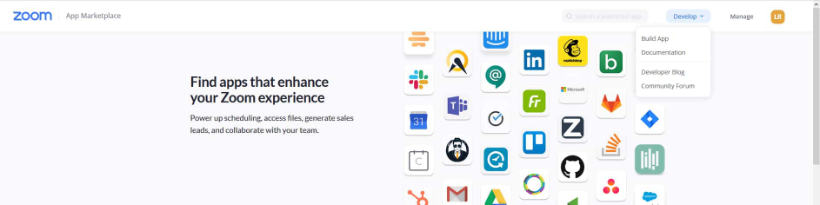
Next, head over to Zoom App Marketplace and login to your account.

Here you will need to create a set of API keys – here’s how:
At the top, right of the Marketplace page you’ll see a dropdown marked ‘Develop’ roll over that and select ‘Build App’.

Zoom Marketplace - Develop

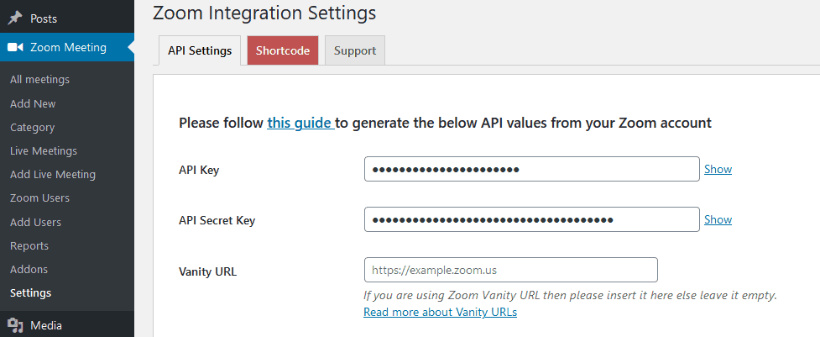
Next, select the ‘JWT’ app type and follow the instructions to set up your API token and secret key. In the App Credentials area, copy your API Key and Secret information and paste them into the plugin settings page.

Zoom Marketplace - JWT

Zoom Marketplace - API settings

And off we Zoom
Now you have your keys set up, integrating meeting details into your event page is pretty much straightforward.

Navigate to Admin > Zoom Meeting > Add new

From there, add the required details and hit publish.

Zoom Meeting

Once the meeting is published, you’ll then be able access the meeting page (just like a regular WordPress post or page) also you’ll see it listed in your Zoom account.
The published meeting generates a shortcode (with meeting ID) that you can then use to embed in any other post or page if you choose.

Play around with the settings, and see what suits you the best.

You can also override the plugin templates if you so desire.

Zoom meeting listings

In summary
Using this plugin allows admins to easily post Zoom meeting details on their WordPress website which in turn gives your visitors 1 click options to join the meeting – via either the Zoom app or their default browser.
Although there is a bit of initial work getting set up, it’s still fairly straightforward, the benefits outweigh the time required and is a great way to manage your Zoom meetings.

On the side
Seasoned Zoom users will also know you can do some crazy things like add a custom background. Naturally we can provide those if you want – fully customised Zoom backgrounds featuring your branding, name, URL and more.

And finally, we also like to offer alternatives where possible, in this case you might want to read our article – Top Three Zoom Alternatives.

If you would like more details or help setting this plugin up, get in touch today.

Top Three Zoom Alternatives

Google Meet

Foresight is a wonderful thing, and if I knew ages ago what’s happening with the world now, I would have sidled up to Eric Yuan and invested in a ton of shares in Zoom.
But, I’m not that blessed so I’m just getting on with my life etching out a living with my company Point and Stare.

Fast forward to the situation we’re all finding ourselves in and we’re having to move a lot of our work online.
Face to face client meetings are out the window, on-site yoga sessions are being stretched and company Town Halls have been made redundant.

The word on the street is to spend some time with the new kid on the block, Zoom.
Everyone is at it, from members of parliament, to global corporations, to the coffee mums, we’re all Zooming around in cyberspace.

No matter what platform you choose, ultimately ease of use needs to be key as well as the option to broadcast directly to Facebook, YouTube, LinkedIn, and other platforms, add your company logo, custom backgrounds and more.

Zoom is a super platform to work with but, it’s nice to have choice so, here are three alternatives that I think you’ll like equally:

StreamYard labels itself as the easiest way to create professional live streams.
A debatable claim in comparison to all the others, Zoom included, but nonetheless it’s easy to get started.

StreamYard is a live streaming studio in your browser which means no apps to download, no complicated settings to fiddle with – just login with an email and away you go.

StreamYard

MeetFromHome is your online events venue
Using the MeetFromHome system you can move around the pixel room and chat with whoever you like just like being in an 8bit world.
It doesn’t get more fun than this.

MeetFromHome

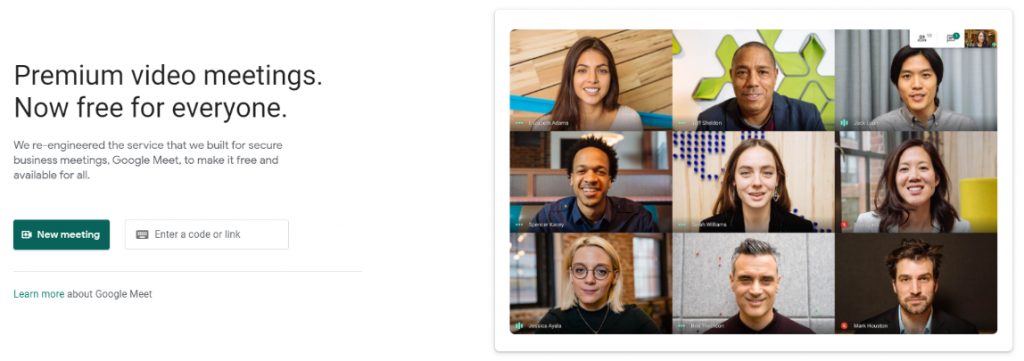
For years we used Google Hangouts as our go to vidcomms platform but, as ususal with Google they’ve moved into getting everyone onto their new platform, Google Meet. Meet was specifically only available as part of your paid for GSuite but they’ve made it free for everyone and is touted to replace the old Hangouts so we can still have the top quality production, safety and versatility of Hangouts, but in the wrapper of Meet.

Google Meet

No matter what platform you choose, Zoom, StreamYard, MeetFromHome or even Google Meet, the key is to treat each other with the respect we want to be treated ourselves, add value to the conversation and enjoy your time online.

If you’re needing any help getting yourself online or need help with any of these platforms, feel free to get in touch.

BONUS:
Another platform I’ve just found is 8×8 which labels itself as a ‘secure, fully featured and free video conferencing’.
I quickly used it, and can confirm it looks promising with some useful features.

SECOND BONUS!
Here’s another quick and easy platform I’ve just discovered – Spike.

FINAL BONUS!
And I found another quick and easy platform – Callaba.

The Best WordPress Agency in London

How Do You Take Your Luxury?

When asked by clients ‘how can I get the message across that I am the best in what I do?’ I cheekily reply, ‘just put it on your website’.
Although I say it with a wry smile, of course, it’s not as simple as just writing ‘The Best WordPress Agency in London’, you need to prove it as well.

If you’ve built your website using a CMS you can simply change a page title or description in the SEO settings to reflect what you want to be found on search engines for, but, naturally that’ll only get you so far.

So, what else is needed? Here’s a few tips to help you on your way.

Content
Without original, regular, fresh content search engines will not have more food to index. The less they index, the further down the rankings you go.
The content you publish should also show the world you mean business, you know what you’re talking about and can prove it.
This content has to be relevant to your product or service – industry highlights, ‘how to’ and hints and tips, like this article, are best.

Telling or listening?
It’s one thing writing and publishing all these articles but, if you’re not actually listening to feedback and/ or questions you may receive then it’s just a broadcast.
The method of delivery is also key.
I always recommend publishing an article firstly on your main business website.
Then, if you have one, send out the information to your mailing list/ subscribers (possibly automated).

Once the dust has settled then you can look at syndicating the article out to various social media platforms.
But, don’t just automate the same content, but, repurpose and think about where it’s going and how it’s delivered.

Posting to your Facebook page should be handled differently to posting on LinkedIn and different again to how you post to Twitter.

Don’t just automate across everywhere, say your thing and be prepared to respond – check back regularly and make time to respond professionally.

Confidence
Part of running a successful business comes down to your love of the product/ service and your confidence to sell it. Don’t publish something that you’re not proud of, have the confidence to back-up and enjoy talking about.
People are not stupid, like animals, they can sense fear and can smell through bullshit.

Be prepared to deviate from what you believe. If enough people tell you ‘that font is too small’ (as an example) then take the time to test different options. Accept you do not know everything and be accepting of learning every single day.

End goal is not the end goal
Being clear about the message you’re looking to get across is key to, well, getting that message across.
Start with an end in mind, a purpose, a clear call to action, if relevant, or indication on the next step.

Publishing a piece of content is never the final chapter – we need to strive to continue publishing useful advice, stories and general content constantly. After all, change is constant and your audience needs updating, regularly.

If you need help with your content or are struggling to prove that you’re the best, get in touch today.

Your Business Community

Your Business Community

Client: Your Business Community
Brief: YBC approached Point and Stare to redevelop and redesign their current Joomla website to a WordPress based platform for UK businesses. The platform is built as a central hub for members to join YBC, with on and offline membership payments, promote their offers, interact with other businesses and attend events.

What is a blog and why does my business need one?

What is a blog and why does my business need one?

Let’s start with the basics …

What is a blog?
What we now know simply as ‘a blog’ started life as a weblog – an online journal displaying the writers thoughts and journeys, usually presented as a list with the latest blog posts appearing at the top. Most times the content would come from a solo source, and sometimes a group of writers sharing their views on a common subject.

Nowadays people have many reasons to start blogging, sometimes for personal reasons and sometimes for writing about their business or interest.
SEO gooroos recommend businesses blog in order to get their websites ranking higher in Google – which, obviously, means ‘mORe BuSinESs’ – naturally.
This advice could not be further from the truth – it’s not as simple as that.

So, why blog?
There are many others running the same business as you, offering the same products or services, some worse, some better, plenty cheaper and some more expensive but, ultimately you’ve no real USP.
As a business you need to prove to your prospects that they should be buying from you.

Proof that you know your shit, as opposed to ‘proof that you’re shit’ comes from displaying your knowledge in an easy to digest format – in other words, blogging or, as I like to call it, writing business or industry related articles – top ten lists, how to guides and the latest ‘thing’ in your industry are generally regarded as the staples and a good place to start.
Ultimately, though, you need to get deeper than that, producing content that not only shows off your skills more succinctly, but, shows that you are the market leader.

Start with a video
Strangely the best place to start publishing a written article is with video.
Videos are gaining importance in the online world and more social media platforms have video options – some pre-recorded uploads and some live.

Of course, none of us really have £10k of kit sitting around our purpose built recording studio but, we all have a mobile phone.

Once you have produced a video you then have a ton of content to work with.

Here’s a list of content options that can be extracted from this one simple video:
Video – upload to YouTube, Vimeo and any of the other many social video platforms available around the web.
HINT: Get the video transcribed and include subtitles.

Podcast – There’s currently a trend for producing podcasts so why not jump in there. Extract the audio from the video and you’ve got yourself a podcast show!

Text – As you’ve sent the video off to be transcribed, using the text as subtitles for the video, you can then create a full blog post or article.

More text – You can now take the big article you published and break the content down into separate articles honing in on a specific area of discussion.

And then?
So, you’ve now published the article on your website but the fun doesn’t stop there.
Create a list of social media platforms that you and your audience hang out and start posting on them.
Remember to refactor the content for those platforms, an article posted on Medium would be different to something posted on LinkedIn, to a tweet etc.

And then?
Of course, a picture speaks a thousand words, so don’t forget to include a relevant image, possibly taken from the video. There’s many sources that list the preferred image sizes for each platform.

And then?
And finally, when you post externally from your website, don’t forget to link back to the original source.

Hopefully this article will give you a few ideas, but of course, feel free to get in touch when you are ready to publish more content for your business.

Chandlers CA

Chandlers CA - Accountants in Camden, London

Client: Chandlers CA – Accountants in Camden, London
Brief: We were asked to take over an outdated website, maintain and contribute to its overall functionality and design. We implemented a clear up of outdated code, added security monitoring and regular updates via our WordPress Maintenance packages, improved the overall SEO and regularly initiate social media postings.

My WordPress website has been hacked!

My WordPress website has been hacked!

Here’s something you might not know – at the start of 2020 over 35% of all websites worldwide were powered by WordPress.
In perspective, that makes for around 200 million websites running on WordPress and that includes big business like CNN, Spotify and CBS right down to the local 1 person shops.

But what happens when it all goes wrong?

Unfortunately, due to the massive market, there are some that like to grab their slice of the pie using nefarious methods like dodgy themes and plugins which can lead to malware and spyware gaining access to your site causing a plethora of issues from scripting errors to unwanted ads.
Definitely not what you want to find at the forefront of your businesses online presence.

What do I do!? What do I do!?
First of all, don’t panic!
Clicking frantically, adding and removing plugins, and pulling the unknown code out of theme or core files will just make the situation worse.

Dependant on the severity of the problem, it might be wise to put your website into maintenance mode, as this will let your visitors know that either you or your developer are on the road to recovering your website without causing any inconvenience to your hard earned traffic.
Your host is a great place to start. Whilst it’s great signing up to a $2 a month deal with unlimited disc space and bandwidth it will, in the end, cost your business. It’s a get-what-you-pay-for sort of thing, and servers should have heightened security, tough firewalls and protection against the thousands of online vulnerabilities. Insecure servers can be susceptive to database injections and exploits that allow the hacker root access.

Big bad wolf?
In rare occurrences, the code can be encrypted and buried within core files, themes & plugins that not always is it effective to remove the exploit, and it has been seen before where it’s simply not possible! To combat this, it’s important to have a daily, weekly or monthly backup of your website so that the last known good configuration of files and the database can be restored. We see time and time again developers that are not taking backups of a website. This can not only be costly to a business in terms of rebuilding or removing the malware, but can also result in a considerable amount of downtime leading to a loss of traffic, possibly search engine rankings, and of course, placing your brand into potential disrepute.

Save me, save me!
Sounds scary, doesn’t it? But it doesn’t have to be. So how do you protect against this?
For a start, it’s important to have 24 hours monitoring not only to ensure that your site remains online but also for malware. Through our maintenance packages, we also include systems that work ensure that your WordPress core files, along with additional themes and plugins, are kept up to date and continue to provide the correct functionality whilst being safe.

Here at Point and Stare we have five levels of WordPress maintenance that are definitely value for money and have additional benefits to the security of your site. We offer 24/7 security & uptime monitoring with every package, and backup all relevant files on a daily, weekly or monthly basis including the WordPress core, themes, plugins & databases so that following a breach, your full website can be restored in a matter of minutes.

Alongside this, our packages offer many other features such as content management for your pages & blogs, as well as the installation of professional SEO facilities and huge speed or loading time improvements. Our customer service is only bettered by John Lewis and we are able to offer priority email and direct telephone support amongst a plethora of other features in our WordPress Maintenance Packages.

If you’d like to learn a little bit more about how we can keep your website warm and snug please check the WordPress Maintenance Packages information and get protection today.

Getting Brand Festive On Instagram

Getting Brand Festive On Instagram

With over 1 billion monthly active users and a faster growth rate than Twitter, Instagram is increasingly becoming the social media platform to beat. Given the numbers, it’s no wonder that so many big-name brands are hopping onto this social media platform in order to attract new customers.

In 2019 we are seeing everybody from Barbour to de GRISOGONO jump onto Instagram. For example, Barbour launched their #BarbourChristmas campaign – in which Barbour used their classic Snowman cartoon from the beginning of October to set the tone in the run up to the festive season.

https://www.instagram.com/p/B4c3cFRHVta/

John Lewis, on the other hand, are using each piece of Instagram content of static images and videos to reinforce its #JohnLewisChristmas hashtag by using visual storytelling to take its’ consumers on a journey.

https://www.instagram.com/p/B5hm0sVlSU6/

Mulberry look towards using Instagram filters to promote user generated content (UGC) giving you the chance to win the Ultimate Mulberry Experience.

It seems obvious that when it comes to promotion, Instagram is one of the places your brand needs to be seen. In order to make the most out of the platform at your next big event, Point and Stare can even provide you with a live Instagram feed allowing visitors to your event to take and upload pictures on their own accounts, use your hashtag, and then see their images displayed on a projection in real time. You could easily turn this into a competition, with a prize for the most creative shot of the day for example.

For more information on how we can harness the power of social media for your business, contact us today.

HOW TO: Maintain My WordPress Website

How Do You Take Your Luxury?

You’ve just spent a huge amount of time and money, or just the weekend and gone for as much free stuff as possible, to build your business website on WordPress and it’s looking good.

The thing is, just like your car, your business or even your own body, if you don’t look after it problems can start to arise.

When it comes to WordPress maintenance, you have two options – do it yourself or get a company to maintain your website for you.

Besides your time, doing it yourself will cost less, but, of course, how much is your time worth, is changing the oil something you really want to be doing and have you the skillset to do it properly?

Presuming you want to do this yourself, here are three areas you should definitely concentrate on regularly to keep your website running as sweet as a Veyron super sport.

Security:
No matter who you are or how your website was built, it’s online therefore it can be hacked.
That said, there are steps you can take to minimise that risk.

Monitor your website for hack attempts
There are a few plugins you can install to let you know when some dirty oik is trying to break in through your back door. The plugin I recommend is WordFence – I also recommend buying into the premium version as it adds extra layers of defence include 2FA logins etc.

Of course, never simply install the plugin and sit back, it needs configuring for maximum effect and regularly checking up on any issues that arise.

Back-ups:
As mentioned before, if you have a website, it can be hacked into, also files can become corrupted or, human error leads to files being deleted or overwritten.
The best route to take, when it comes to backing up your website, is to regularly manually download all the files and database but, of course, that takes time and effort.
If you can and want to go this route, I totally recommend it BUT don’t just download to your work laptop – that can be stolen, the hard drive give up the ghost or, like your wedding video, can be overwritten.

WordPress Maintenance Packages

If you have a decent web host they should offer a back-up service, sometimes free, but you should only use this as part of your overall back-up strategy.

As part of our WordPress Maintenance packages we always back-up automatically and manually to 3 online and 2 offline points.

Also, backing up the core and theme files is fine, but pay particular attention to the database as without this you have nothing.

Uptime monitoring:
Like calling the operator to check your phone line is working, is your website actually still online?
If not, it could be hours, weeks or more before you realise and then you have a panic on to drop everything and deal with it immediately – how much business have you lost because you didn’t realise?

We use various online services and methods that tie into either messaging services, txt or email but one online service I recommend is Uptime Robot.

Uptime Robot can be set up to ping you if your website is offline for at least 5 minutes – it could be a simple bottleneck in the traffic, it could be that your server has melted, but either way you will be alerted.
If you do get a ping, the next steps would be to check your website is actually reachable via your browser and use DFEOJM.

So, these are crucial tasks to start you off maintaining your WordPress based website, but, of course, we’re only just skimming the service – there’s a whole mass of other areas that need to be considered which we cover in our WordPress Maintenance packages so get in contact today and get yourself secured.